Sprunki Sinner Kiss
Sprunki Sinner Kiss
Obby: Fling Stuff and People
Urban Sniper Escape

FPV War Kamikaze Drone
Opening Cases - Knock Out The Arcana!

Worm out: Brain teaser games
Cars: Modes

Fairyland Merge & Magic
Robby: Escape The Rooms

TipTop: Tricky Challenges
Help Sprunki: Survival Simulator
Red and Blue Stick: fire and water 2

Beamng: Online City

Sprunki Sinner Kiss
Sprunki Sinner Kiss
Obby: Fling Stuff and People
Obby: Fling Stuff and People
Urban Sniper Escape
Urban Sniper Escape
FPV War Kamikaze Drone
FPV War Kamikaze Drone
Opening Cases - Knock Out The Arcana!
Opening Cases - Knock Out The Arcana!
Worm out: Brain teaser games
Worm out: Brain teaser games
Cars: Modes
Cars: Modes
Fairyland Merge & Magic
Fairyland Merge & Magic
Robby: Escape The Rooms
Robby: Escape The Rooms
TipTop: Tricky Challenges
TipTop: Tricky Challenges
Help Sprunki: Survival Simulator
Help Sprunki: Survival Simulator
Red and Blue Stick: fire and water 2
Red and Blue Stick: fire and water 2
Beamng: Online City
Beamng: Online City
Words with hints
Words with hints

Hunter with rifle
Hunter with rifle

A Wonderful Field: capital show
A Wonderful Field: capital show

Minecraft Editor
Minecraft Editor

Fun Clicker: Poppy Playtime 5
Fun Clicker: Poppy Playtime 5
Private Stand 2 Gold: Cheat and Promo Code
Private Stand 2 Gold: Cheat and Promo Code
Ultimate Fishing: Reel Catch
Ultimate Fishing: Reel Catch

Friday Night Funkin vs Imposter 2.0
Friday Night Funkin vs Imposter 2.0

Zombie Defense: Building Clearance
Zombie Defense: Building Clearance

Prison Escape Simulator 3D: Dig Out Master Journey
Prison Escape Simulator 3D: Dig Out Master Journey
Hospital Simulator 2025
Hospital Simulator 2025
Match 4
Match 4
Parkour in the tower of hell
Parkour in the tower of hell
Solitaire Classic Klondike
Solitaire Classic Klondike

Girl's Closet: Match & Clear
Girl's Closet: Match & Clear
Escape from Lava!
Escape from Lava!
Checkers
Checkers

Sprunki Phase 3
Sprunki Phase 3
Playground: Ragdoll War
Playground: Ragdoll War
Attack Hole
Attack Hole
Top Sniper
Top Sniper

DOP Complete the Picture
DOP Complete the Picture
Hexa Sort Puzzle
Hexa Sort Puzzle

Trampoline Basketball 3D
Trampoline Basketball 3D
Block Escape: Brain Training
Block Escape: Brain Training
Playground
Playground
Sprunki Action Playground: Ragdoll Sandbox
Sprunki Action Playground: Ragdoll Sandbox
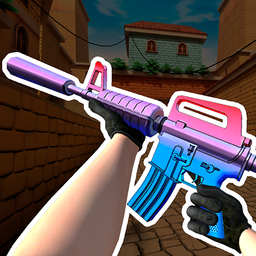
KS Z is a stylized 3D shooter built around fast battlefield decisions, team choice, and flexible combat. You choose between the red and blue sides, then fight through modes that change the pace from direct team battles to objective pressure, survival chaos, or every-player-for-themself action.
The game is especially useful for players who want a browser shooter with familiar movement, clear combat goals, and enough weapon variety to change tactics between rounds. It keeps the focus on shooting, positioning, and reacting quickly, while the disarm-and-capture option adds a tactical layer beyond simply eliminating opponents.
Each match starts with a side choice and then pushes you into compact 3D firefights where movement and weapon control matter. Teams mode centers on red-versus-blue combat, Deathmatch favors quick eliminations, Bomb adds objective-based pressure, Zombies changes the threat you are facing, and All Against Everyone turns the match into a solo free-for-all.
Because the modes ask for different reactions, a good run is not only about shooting first. In team modes, watch where allies are moving and avoid rushing into open areas alone. In free-for-all or Zombies, keep enough space to react, use the battlefield layout, and be ready to change your approach when enemies close in.
KS Z includes 17 weapon types, with grenades also part of the arsenal. That variety gives each round room for experimentation: some moments reward direct aim, while others favor quick repositioning, grenade pressure, or taking advantage of an enemy who has been disarmed.
The source game also highlights bright weapon skins, so the action has a visual customization angle as well as a tactical one. Skins do not need to change the goal of the match to matter; they give the battlefield more personality while you focus on movement, aim, and mode objectives.
On desktop, KS Z uses familiar shooter inputs: move with WASD, jump with Space, shoot with the left mouse button, and use the interaction key to take weapons when the situation allows it. On mobile and tablet, the verified source supports on-screen interaction for the same weapon-taking action.
If you want more browser shooters after KS Z, try CS 1 for another tactical FPS-style option, or move into timing-heavy action with Time Shooter 3: SWAT. For a broader combat-focused pick, Speakerman Revenge is another confirmed Funavio action game worth checking.
KS Z is a stylized 3D shooter with red and blue teams, multiple combat modes, 17 weapon types, grenades, skins, and tactical disarming.
Use WASD to move, Space to jump, the left mouse button to shoot, and E to interact with weapons.
The verified modes are Teams, Bomb, Deathmatch, Zombies, and All Against Everyone.
Yes. The verified device support includes desktop, mobile, and tablet play.