Sprunki Sinner Kiss
Sprunki Sinner Kiss
Obby: Fling Stuff and People
Urban Sniper Escape

FPV War Kamikaze Drone

Opening Cases - Knock Out The Arcana!

Worm out: Brain teaser games

Cars: Modes

Fairyland Merge & Magic
Robby: Escape The Rooms

TipTop: Tricky Challenges
Help Sprunki: Survival Simulator
Red and Blue Stick: fire and water 2

Beamng: Online City

Sprunki Sinner Kiss
Sprunki Sinner Kiss
Obby: Fling Stuff and People
Obby: Fling Stuff and People
Urban Sniper Escape
Urban Sniper Escape
FPV War Kamikaze Drone
FPV War Kamikaze Drone
Opening Cases - Knock Out The Arcana!
Opening Cases - Knock Out The Arcana!
Worm out: Brain teaser games
Worm out: Brain teaser games
Cars: Modes
Cars: Modes
Fairyland Merge & Magic
Fairyland Merge & Magic
Robby: Escape The Rooms
Robby: Escape The Rooms
TipTop: Tricky Challenges
TipTop: Tricky Challenges
Help Sprunki: Survival Simulator
Help Sprunki: Survival Simulator
Red and Blue Stick: fire and water 2
Red and Blue Stick: fire and water 2
Beamng: Online City
Beamng: Online City
Words with hints
Words with hints

Hunter with rifle
Hunter with rifle

A Wonderful Field: capital show
A Wonderful Field: capital show

Minecraft Editor
Minecraft Editor

Fun Clicker: Poppy Playtime 5
Fun Clicker: Poppy Playtime 5
Private Stand 2 Gold: Cheat and Promo Code
Private Stand 2 Gold: Cheat and Promo Code
Ultimate Fishing: Reel Catch
Ultimate Fishing: Reel Catch

Friday Night Funkin vs Imposter 2.0
Friday Night Funkin vs Imposter 2.0
Zombie Defense: Building Clearance
Zombie Defense: Building Clearance

Prison Escape Simulator 3D: Dig Out Master Journey
Prison Escape Simulator 3D: Dig Out Master Journey
Hospital Simulator 2025
Hospital Simulator 2025
Match 4
Match 4
Parkour in the tower of hell
Parkour in the tower of hell
Solitaire Classic Klondike
Solitaire Classic Klondike

Girl's Closet: Match & Clear
Girl's Closet: Match & Clear

Escape from Lava!
Escape from Lava!
Checkers
Checkers

Sprunki Phase 3
Sprunki Phase 3
Playground: Ragdoll War
Playground: Ragdoll War

Attack Hole
Attack Hole
Top Sniper
Top Sniper

DOP Complete the Picture
DOP Complete the Picture

Hexa Sort Puzzle
Hexa Sort Puzzle

Trampoline Basketball 3D
Trampoline Basketball 3D
Block Escape: Brain Training
Block Escape: Brain Training
Playground
Playground
Sprunki Action Playground: Ragdoll Sandbox
Sprunki Action Playground: Ragdoll Sandbox
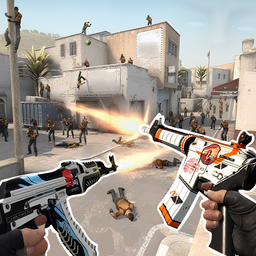
CS 1 is an online FPS combat simulator built around the feeling of competitive tactical shooters. You move through levels, build CS teams, test your aim, and improve your character while chasing the role of a sharper counter player. The game focuses on shooting skill and tactical decisions, so quick reactions matter, but clean positioning and controlled aim matter just as much.
CS 1 puts you in a shooter setting inspired by eSports-style firefights. The verified game description highlights team assembly, level progression, shooting practice, tactics, and character upgrades. That gives the page a clear loop: enter a level, handle combat, sharpen your skills, and keep improving your setup for harder challenges.
The tone is familiar if you enjoy browser shooters with fast movement and precise aiming. For another tactical shooting option on Funavio, try Time Shooter 3: SWAT, which also rewards calm aim and smart timing in tight combat situations.
Start by learning the movement rhythm. Use the keyboard to reposition, jump, and run, then use the mouse to aim and fire when your shot is lined up. Because the game is built around shooting and tactics, rushing every encounter is not always the smartest approach. Move with purpose, watch your angles, and aim before you commit to a fight.
Progression comes from working through different levels and improving your character. The source description also points to assembling CS teams, so the game is not only about firing quickly; it is about building toward stronger runs as the challenges continue.
On desktop, CS 1 uses classic FPS inputs: WASD for walking, the left mouse button for shooting, the right mouse button for aiming, Space for jumping, and Left Shift for running. Those controls make it easy to understand if you have played keyboard-and-mouse shooters before.
For better results, keep your movement smooth instead of tapping keys randomly. Run when you need to reposition, jump only when it helps your angle, and use aiming when precision matters. Players who like CS-style action may also enjoy KS Z, another Funavio shooter with tactical movement and weapon-focused combat.
If you want a more chaotic FPS after a few CS 1 runs, Funny Shooter 2 is a good contrast because it keeps the shooting focus but shifts the mood toward brighter arcade action.
CS 1 supports desktop, mobile, and tablet play. Desktop is the clearest fit for the verified keyboard-and-mouse controls, while mobile and tablet support make it easier to jump in from a phone or touchscreen device when available in your browser.
Move through levels, aim carefully, shoot enemies, assemble CS teams, and improve your character as you build better FPS skills.
On desktop, use WASD to move, left click to shoot, right click to aim, Space to jump, and Left Shift to run.
Yes. The verified device support includes desktop, mobile, and tablet, including Android and iOS platforms.
CS 1 was developed by FPSMaster.