Sprunki Sinner Kiss
Sprunki Sinner Kiss

Obby: Fling Stuff and People
Urban Sniper Escape

FPV War Kamikaze Drone

Opening Cases - Knock Out The Arcana!

Worm out: Brain teaser games

Cars: Modes

Fairyland Merge & Magic
Robby: Escape The Rooms

TipTop: Tricky Challenges

Help Sprunki: Survival Simulator
Red and Blue Stick: fire and water 2

Beamng: Online City

Sprunki Sinner Kiss
Sprunki Sinner Kiss
Obby: Fling Stuff and People
Obby: Fling Stuff and People
Urban Sniper Escape
Urban Sniper Escape
FPV War Kamikaze Drone
FPV War Kamikaze Drone
Opening Cases - Knock Out The Arcana!
Opening Cases - Knock Out The Arcana!
Worm out: Brain teaser games
Worm out: Brain teaser games
Cars: Modes
Cars: Modes
Fairyland Merge & Magic
Fairyland Merge & Magic
Robby: Escape The Rooms
Robby: Escape The Rooms
TipTop: Tricky Challenges
TipTop: Tricky Challenges
Help Sprunki: Survival Simulator
Help Sprunki: Survival Simulator
Red and Blue Stick: fire and water 2
Red and Blue Stick: fire and water 2
Beamng: Online City
Beamng: Online City
Words with hints
Words with hints

Hunter with rifle
Hunter with rifle

A Wonderful Field: capital show
A Wonderful Field: capital show
Minecraft Editor
Minecraft Editor

Fun Clicker: Poppy Playtime 5
Fun Clicker: Poppy Playtime 5

Private Stand 2 Gold: Cheat and Promo Code
Private Stand 2 Gold: Cheat and Promo Code

Ultimate Fishing: Reel Catch
Ultimate Fishing: Reel Catch

Friday Night Funkin vs Imposter 2.0
Friday Night Funkin vs Imposter 2.0

Zombie Defense: Building Clearance
Zombie Defense: Building Clearance

Prison Escape Simulator 3D: Dig Out Master Journey
Prison Escape Simulator 3D: Dig Out Master Journey
Hospital Simulator 2025
Hospital Simulator 2025
Match 4
Match 4
Parkour in the tower of hell
Parkour in the tower of hell
Solitaire Classic Klondike
Solitaire Classic Klondike

Girl's Closet: Match & Clear
Girl's Closet: Match & Clear

Escape from Lava!
Escape from Lava!
Checkers
Checkers

Sprunki Phase 3
Sprunki Phase 3

Playground: Ragdoll War
Playground: Ragdoll War

Attack Hole
Attack Hole
Top Sniper
Top Sniper

DOP Complete the Picture
DOP Complete the Picture
Hexa Sort Puzzle
Hexa Sort Puzzle

Trampoline Basketball 3D
Trampoline Basketball 3D
Block Escape: Brain Training
Block Escape: Brain Training

Playground
Playground
Sprunki Action Playground: Ragdoll Sandbox
Sprunki Action Playground: Ragdoll Sandbox
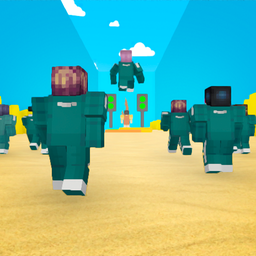
Squid Game: Mini Games is a browser arcade game built around short challenge levels, quick movement, and a bright Minecraft-style look. Each level gives you a new test to clear, so the page is less about memorizing a long rulebook and more about reading the obstacle in front of you, moving cleanly, and staying focused until the end of the stage.
The game keeps the setup simple: move your character, jump when the route demands it, and use logic and timing to pass each challenge. If you enjoy themed challenge games, you may also want to try Squid game: The second season or Squid Game: Royale after this one.
The experience is presented as a series of levels where every stage is a new challenge. That makes each attempt feel direct and readable: look at the layout, decide how to move, then use careful steps and jumps to get through the test. The Minecraft-style visuals make the action easy to follow, with vivid blocky environments and characters on screen.
The best way to approach Squid Game: Mini Games is to treat every level as its own small puzzle. Do not assume the next challenge works exactly like the last one. Watch the space around your character, use movement in short corrections, and jump only when the route gives you a clear reason to do it.
On desktop, Squid Game: Mini Games uses WASD for movement, Space to jump, and Tab to pause. On mobile, movement is handled with the left-side joystick, jumping uses the button on the right side of the screen, and camera rotation is controlled from the right side with pinch-and-move gestures.
That control layout makes the game easy to start, but clean movement still matters. Small corrections are usually better than rushing straight through a challenge, especially when a level asks for timing or careful positioning. Players who like compact arcade stages can also check Obby: Mini-Games for another confirmed Funavio mini-game page.
Most players looking for Squid Game: Mini Games want a quick online challenge game with simple controls, themed levels, and no complicated setup. This page focuses on the exact game, its movement controls, and the level-based challenge format instead of adding unsupported features or details from other similarly named games.
Clear each challenge level by moving carefully, jumping when needed, and using logic to pass the current test.
Use WASD to move, Space to jump, and Tab to pause the game.
Yes. The verified device support includes desktop, mobile, and tablet play.
Squid Game: Mini Games was developed by Hamster Studio.