Sprunki Sinner Kiss
Sprunki Sinner Kiss
Obby: Fling Stuff and People
Urban Sniper Escape

FPV War Kamikaze Drone
Opening Cases - Knock Out The Arcana!

Worm out: Brain teaser games

Cars: Modes

Fairyland Merge & Magic
Robby: Escape The Rooms

TipTop: Tricky Challenges

Help Sprunki: Survival Simulator
Red and Blue Stick: fire and water 2

Beamng: Online City

Sprunki Sinner Kiss
Sprunki Sinner Kiss
Obby: Fling Stuff and People
Obby: Fling Stuff and People
Urban Sniper Escape
Urban Sniper Escape
FPV War Kamikaze Drone
FPV War Kamikaze Drone
Opening Cases - Knock Out The Arcana!
Opening Cases - Knock Out The Arcana!
Worm out: Brain teaser games
Worm out: Brain teaser games
Cars: Modes
Cars: Modes
Fairyland Merge & Magic
Fairyland Merge & Magic
Robby: Escape The Rooms
Robby: Escape The Rooms
TipTop: Tricky Challenges
TipTop: Tricky Challenges
Help Sprunki: Survival Simulator
Help Sprunki: Survival Simulator
Red and Blue Stick: fire and water 2
Red and Blue Stick: fire and water 2
Beamng: Online City
Beamng: Online City
Words with hints
Words with hints

Hunter with rifle
Hunter with rifle

A Wonderful Field: capital show
A Wonderful Field: capital show
Minecraft Editor
Minecraft Editor

Fun Clicker: Poppy Playtime 5
Fun Clicker: Poppy Playtime 5
Private Stand 2 Gold: Cheat and Promo Code
Private Stand 2 Gold: Cheat and Promo Code

Ultimate Fishing: Reel Catch
Ultimate Fishing: Reel Catch

Friday Night Funkin vs Imposter 2.0
Friday Night Funkin vs Imposter 2.0
Zombie Defense: Building Clearance
Zombie Defense: Building Clearance

Prison Escape Simulator 3D: Dig Out Master Journey
Prison Escape Simulator 3D: Dig Out Master Journey
Hospital Simulator 2025
Hospital Simulator 2025
Match 4
Match 4
Parkour in the tower of hell
Parkour in the tower of hell
Solitaire Classic Klondike
Solitaire Classic Klondike

Girl's Closet: Match & Clear
Girl's Closet: Match & Clear
Escape from Lava!
Escape from Lava!
Checkers
Checkers

Sprunki Phase 3
Sprunki Phase 3
Playground: Ragdoll War
Playground: Ragdoll War

Attack Hole
Attack Hole
Top Sniper
Top Sniper

DOP Complete the Picture
DOP Complete the Picture

Hexa Sort Puzzle
Hexa Sort Puzzle

Trampoline Basketball 3D
Trampoline Basketball 3D
Block Escape: Brain Training
Block Escape: Brain Training
Playground
Playground
Sprunki Action Playground: Ragdoll Sandbox
Sprunki Action Playground: Ragdoll Sandbox
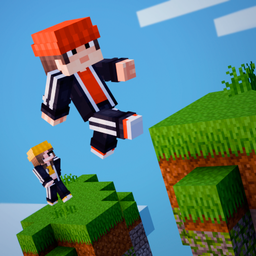
Parkour Online is a multiplayer parkour game about moving through a large open map with other players around you. The goal is simple to understand but satisfying to practice: run, jump, climb, test different routes, and look for hidden secrets while you improve your movement from attempt to attempt.
The game stands out because climbing is part of the core movement. Instead of relying only on jumps, you can grab a ledge by holding the left mouse button and aiming above a block. That makes missed-looking jumps feel recoverable when your timing and aim are good, and it gives vertical routes a more physical feel than a basic platform game.
Each session places you in an open parkour space where movement is the main challenge. You use precise timing to cross gaps, climb up blocks, and keep searching for better paths. Other players can be on the same map, so the game also has a social rhythm: you can watch how someone else handles a jump, ask for help in chat, or explore with friends instead of treating every run like a solo challenge.
Character skins add a light customization layer, but the real focus stays on route-finding. The more you experiment with jumps and ledges, the easier it becomes to spot paths that are not obvious on the first try. If you enjoy obstacle-course games with vertical movement, Obby Parkour: Tower of Hell is another Funavio parkour pick with a stronger tower-course angle.
On desktop, movement uses WASD. To grab onto a block, hold the left mouse button and aim above the ledge you want to catch. That control matters because it changes how you approach walls and high platforms: you are not only jumping toward a landing, you are also aiming for a reachable edge.
Good ledge use comes from looking slightly above the block rather than only at the gap. If a jump feels too high, try approaching it as a climb and check whether the edge can be caught. For more movement-focused arcade routes, Climb and Jump - Obby Tower is a useful related game to try after Parkour Online.
Parkour Online is built for shared play as well as solo practice. Friends can move through the map together, compare routes, and use skins to recognize each other during a session. The multiplayer side does not need to turn every jump into a race; it can simply make practice feel more active because other players are solving the same space around you.
If the social side is what pulls you in, Obby with Friends Online has a similar friends-and-obby appeal. Parkour Online remains the better fit when you specifically want ledge grabbing, open-map exploration, and climbing as part of the movement loop.
Parkour Online supports desktop, mobile, and tablet play. Desktop players get clear WASD movement and mouse-ledging controls. On any device, the best experience comes from taking time to read the map, practise tricky jumps, and use the multiplayer space as a place to learn routes instead of rushing every obstacle.
Yes. Parkour Online lets you move through the map with other players, use chat, and play with friends.
Hold the left mouse button and aim above a block to grab onto its ledge.
Yes. The verified device support includes desktop, mobile, and tablet.