Sprunki Sinner Kiss
Sprunki Sinner Kiss

Obby: Fling Stuff and People
Urban Sniper Escape

FPV War Kamikaze Drone

Opening Cases - Knock Out The Arcana!

Worm out: Brain teaser games

Cars: Modes

Fairyland Merge & Magic
Robby: Escape The Rooms

TipTop: Tricky Challenges
Help Sprunki: Survival Simulator
Red and Blue Stick: fire and water 2

Beamng: Online City

Sprunki Sinner Kiss
Sprunki Sinner Kiss
Obby: Fling Stuff and People
Obby: Fling Stuff and People
Urban Sniper Escape
Urban Sniper Escape
FPV War Kamikaze Drone
FPV War Kamikaze Drone
Opening Cases - Knock Out The Arcana!
Opening Cases - Knock Out The Arcana!
Worm out: Brain teaser games
Worm out: Brain teaser games
Cars: Modes
Cars: Modes
Fairyland Merge & Magic
Fairyland Merge & Magic
Robby: Escape The Rooms
Robby: Escape The Rooms
TipTop: Tricky Challenges
TipTop: Tricky Challenges
Help Sprunki: Survival Simulator
Help Sprunki: Survival Simulator
Red and Blue Stick: fire and water 2
Red and Blue Stick: fire and water 2
Beamng: Online City
Beamng: Online City
Words with hints
Words with hints

Hunter with rifle
Hunter with rifle

A Wonderful Field: capital show
A Wonderful Field: capital show

Minecraft Editor
Minecraft Editor

Fun Clicker: Poppy Playtime 5
Fun Clicker: Poppy Playtime 5

Private Stand 2 Gold: Cheat and Promo Code
Private Stand 2 Gold: Cheat and Promo Code
Ultimate Fishing: Reel Catch
Ultimate Fishing: Reel Catch

Friday Night Funkin vs Imposter 2.0
Friday Night Funkin vs Imposter 2.0

Zombie Defense: Building Clearance
Zombie Defense: Building Clearance

Prison Escape Simulator 3D: Dig Out Master Journey
Prison Escape Simulator 3D: Dig Out Master Journey

Hospital Simulator 2025
Hospital Simulator 2025
Match 4
Match 4
Parkour in the tower of hell
Parkour in the tower of hell
Solitaire Classic Klondike
Solitaire Classic Klondike

Girl's Closet: Match & Clear
Girl's Closet: Match & Clear

Escape from Lava!
Escape from Lava!
Checkers
Checkers

Sprunki Phase 3
Sprunki Phase 3

Playground: Ragdoll War
Playground: Ragdoll War
Attack Hole
Attack Hole

Top Sniper
Top Sniper

DOP Complete the Picture
DOP Complete the Picture
Hexa Sort Puzzle
Hexa Sort Puzzle

Trampoline Basketball 3D
Trampoline Basketball 3D
Block Escape: Brain Training
Block Escape: Brain Training

Playground
Playground

Sprunki Action Playground: Ragdoll Sandbox
Sprunki Action Playground: Ragdoll Sandbox
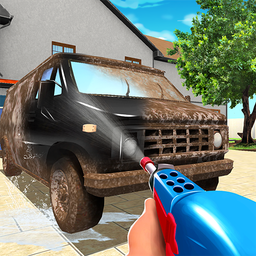
Clean 3D is a casual 3D cleaning simulation game about restoring messy objects with a water gun. Instead of a flat cleaning screen, each task gives you a 3D object to work around, so the main challenge is moving carefully, spraying the dirty areas, and watching the cleaning indicator until the job is complete.
The verified game setup includes five levels with objects such as murals, cars, carpets, and bathtubs. Each level rewards steady coverage more than rushing, because missed spots can keep the progress indicator from reaching the finish. If you like simple cleaning and organizing games, Clean the Room: Shelves and Objects Sorting is another tidy-up style game on Funavio.
Your goal in each level is to move the cleaning gun across the object and spray water until the surface is restored. The upper-right cleaning indicator helps you judge how much dirt remains, which makes it easier to slow down and check corners, curves, or wider surfaces before moving on.
Clean 3D also gives you four nozzle choices. The source confirms that each nozzle uses a different amount of water, so switching nozzles is part of the cleaning rhythm. A careful approach is to use the spray in controlled passes, check the indicator, then adjust your aim or nozzle choice when a section still needs attention.
Progression is built around completing cleaning levels and earning coins. Those coins can be used to unlock guns, giving each finished task a purpose beyond simply clearing the current object. The loop stays easy to understand: clean the surface, finish the level, collect coins, and work toward another gun.
The variety of objects matters because murals, cars, carpets, and bathtubs do not feel identical to clean. Wide flat areas reward smooth coverage, while detailed shapes ask you to pay closer attention to where the water is landing. For another restoration-focused game with a 3D feel, try Restore Car 3D.
On desktop, the verified controls are simple: move with the keyboard and press the spray button to wash the object. Clean 3D supports desktop, mobile, and tablet play, so the same basic idea works as a quick browser session whether you are cleaning one level or trying to unlock more guns over time.
The game is best played patiently. Sweep across the object in sections, keep checking the progress indicator, and avoid bouncing from one dirty spot to another too quickly. If you enjoy small restoration tasks, Restore the Phone offers a related repair-and-cleanup theme, while Toca World Cleaning is another Funavio option for cleaning-focused play.
Move the cleaning gun around each object, spray water on dirty areas, and use the cleaning indicator to see how much work remains.
Clean 3D was developed by Ohayo.
Yes. The verified device support includes desktop, mobile, and tablet play.
Coins are earned by completing levels and can be used to unlock guns.